Tutorial 12: Uploading Your Own Datasets#
OpenWebSearch.eu allows you to upload and share your datasets through the LEXIS Platform, provided by our HPC partners.
Prerequisites#
Install py4lexis (
pip install py4lexis --index-url https://opencode.it4i.eu/api/v4/projects/107/packages/pypi/simple)Have an account with permission to use OpenWebSearch.eu project resources
👉 Please contact us if you need access and request access in the Lexis Portal as follows:
Login to the Lexis Portal using the B2Access Federator. You should be able to use your academic home login, ORCID or social login, although we encourage the former too.
Go to Projects and hit Request Project Access. Fill in “openwebsearch” in the form
contact us separately via E-Mail / or Mattermost to give us a reason to give you access.
Step 1 – Login#
Log in with py4lexis:
python -m py4lexis.cli session login-url
Step 2 – Choose a Storage Location#
Determine the available storages for the openwebsearch project:
python -m py4lexis.cli datasets get-project-storages openwebsearch
Step 3 – Prepare Metadata (DataCite JSON)#
Fill out a DataCite JSON template. A minimal example looks like this:
{
  "creators": [
    {
      "name": "THE CREATOR"
    }
  ],
  "titles": [
    {
      "lang": "en",
      "title": "THE TITLE"
    }
  ],
  "publisher": {
    "name": "THE CREATOR"
  },
  "types": {
    "resourceType": "Dataset",
    "resourceTypeGeneral": "Dataset"
  },
  "publicationYear": 2025
}
You can also generate a minimal JSON via Python:
from py4lexis.models.datacite_model import Datacite
print(Datacite.get_basic_data("THE CREATOR", "THE TITLE"))
Step 4 – (Optional) Provide a More Complete DataCite JSON#
We recommend using a more complete DataCite JSON (this can also be edited later via the portal):
{
  "creators": [
    {
      "name": "THE CREATOR"
    }
  ],
  "titles": [
    {
      "lang": "en",
      "title": "THE TITLE"
    }
  ],
  "publisher": {
    "name": "THE CREATOR"
  },
  "types": {
    "resourceType": "Dataset",
    "resourceTypeGeneral": "Dataset"
  },
  "publicationYear": 2025,
  "dates": [
    {
      "date": "2025-06-09T00:00:00",
      "dateType": "Updated"
    },
    {
      "date": "2025-06-09T00:00:00",
      "dateType": "Other",
      "dateInformation": "startDate"
    },
    {
      "date": "2025-06-09T00:00:00",
      "dateType": "Other",
      "dateInformation": "endDate"
    }
  ],
  "fundingReferences": [
    {
      "funderName": "European Commission",
      "funderIdentifier": "https://doi.org/10.13039/501100000780",
      "funderIdentifierType": "Crossref Funder ID",
      "awardNumber": "101070014",
      "awardUri": "https://cordis.europa.eu/project/id/101070014",
      "awardTitle": "Piloting a Cooperative Open Web Search Infrastructure to Support Europe's Digital Sovereignty"
    }
  ]
}
👉 objectCount should be set to the number of rows if available.
Step 5 – Create the Dataset#
Add additional metadata for findability:
"additionalMetadata": {
  "collectionName": "special",
  "totalSize": 192781845880,
  "fileCount": 3361,
  "objectCount": 59215037
}
Command template:
python -m py4lexis.cli datasets create-dataset project openwebsearch "iRODS IT4I" "iRODS LEXIS V2" --title "THE TITLE" --datacite '{
  "creators": [{"name": "THE CREATOR"}],
  "titles": [{"lang": "en", "title": "THE TITLE"}],
  "publisher": {"name": "THE CREATOR"},
  "types": {"resourceType": "owix", "resourceTypeGeneral": "Dataset"},
  "publicationYear": 2025,
  "dates": [
    {"date": "2025-06-09T00:00:00", "dateType": "Updated"},
    {"date": "2025-06-09T00:00:00", "dateType": "Other", "dateInformation": "startDate"},
    {"date": "2025-06-09T00:00:00", "dateType": "Other", "dateInformation": "endDate"}
  ],
  "fundingReferences": [
    {
      "funderName": "European Commission",
      "funderIdentifier": "https://doi.org/10.13039/501100000780",
      "funderIdentifierType": "Crossref Funder ID",
      "awardNumber": "101070014",
      "awardUri": "https://cordis.europa.eu/project/id/101070014",
      "awardTitle": "Piloting a Cooperative Open Web Search Infrastructure to Support Europe's Digital Sovereignty"
    }
  ]
}' --additional-metadata '{
  "collectionName": "special",
  "totalSize": 192781845880,
  "fileCount": 3361,
  "objectCount": 59215037
}'
Use
projectfor restricted datasets (project members only).Use
publicto make the dataset visible to all users.
The command will return a unique dataset ID, e.g.:
The dataset was successfully created with dataset ID: 4322b10c-8fa6-11f0-b931-c687956b5905
You can also find the dataset ID in the Lexis Portal → Datasets → Copy ID.
Step 6 – Review and Edit Metadata#
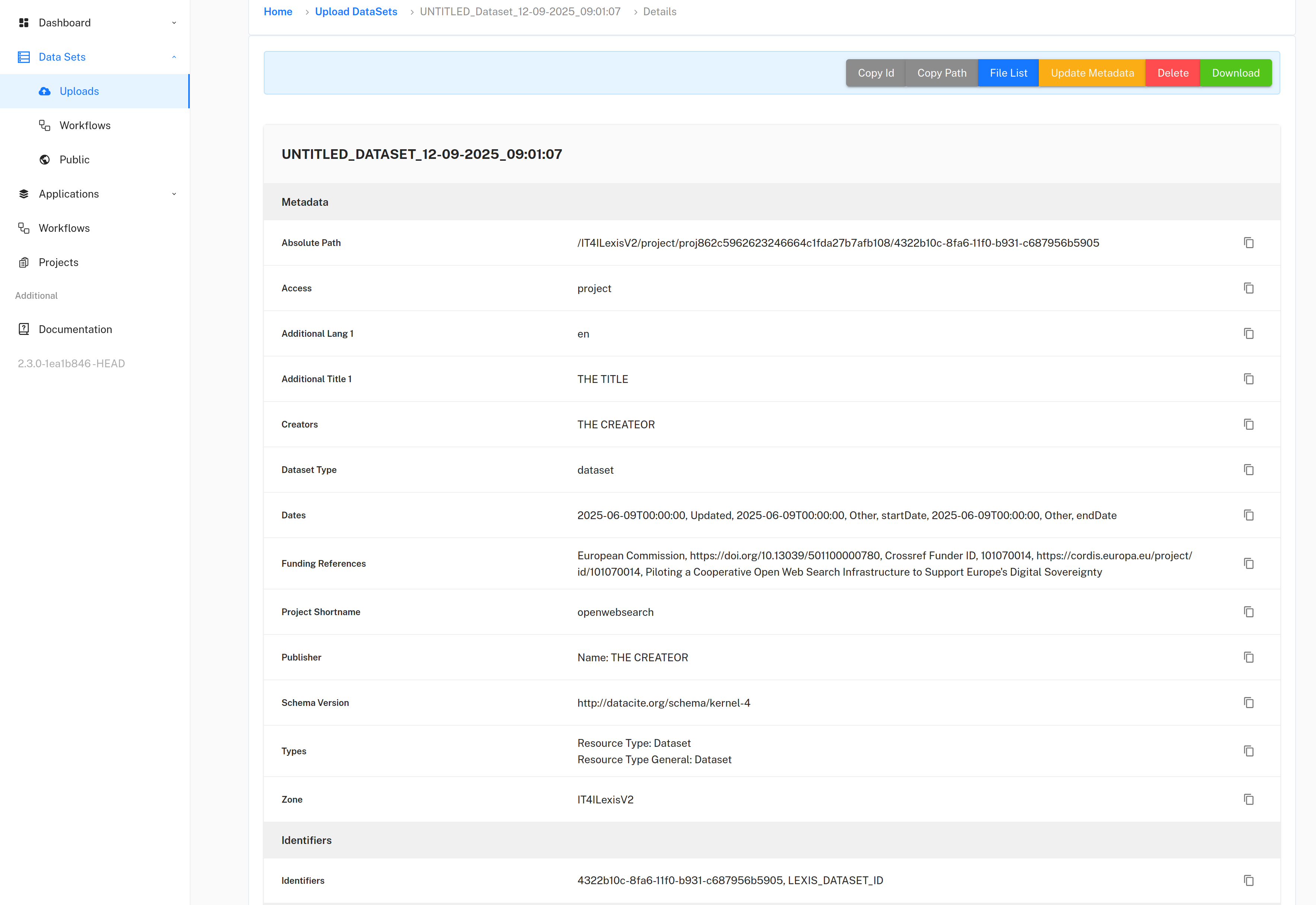
Go to the Lexis Portal → Uploads to review your dataset.
Metadata can be edited there (e.g., license, related publications).
Publications should be listed under
relatedIdentifiers.
Step 7 – Upload Files#
Example for uploading a file:
python -m py4lexis.cli datasets tus-uploader-rewrite 4322b10c-8fa6-11f0-b931-c687956b5905 openwebsearch cc/myfile.parquet "iRODS IT4I" "iRODS LEXIS V2" --file-path . --destination-path /
This works for archives and single files.
Directory upload is under development, but you can script uploads (Python or shell).
Step 8 – Upload Directories (Optional, Faster)#
If your firewall allows iRODS connections, you can upload directories directly:
python -m py4lexis.cli lexis-irods upload-directory-to-dataset cc project openwebsearch 4322b10c-8fa6-11f0-b931-c687956b5905
Here we assume that cc is a subfolder of the current directory.
Step 9 – Final Check#
After upload:
Inspect your dataset in the Lexis Portal.
Optionally ask the OpenWebSearch team to star your dataset at the OpenWebIndex portal.
Public datasets can be linked via:
https://portal.lexis.tech/publicDataSets/<DATASETID>/details
Example Datasets Uploaded#
Coral-NLP/German-corpus#
The Coral-NLP/German-Corpus is a comprehensive collection of German-language text data under open licenses for training German language models. It has been uploaded to Huggingface, but is also shared via the Lexis Plattform in OpenWebSearch.eu
# Download the datasets
hf download "coral-nlp/german-commons" --repo-type dataset --local-dir ./german_commons
Note that you need to have a login with B2ACCESS or any other identity provider supported by Lexis. If you have none, B2ACCESS allows to create one via social login (ORCID, Github, etc.)
# Login to the Lexis Portal
python -m py4lexis.cli.session login-url
#....you will get an inner console....from there, create the dataset
python -m py4lexis.cli datasets create-dataset public openwebsearch "iRODS IT4I" "iRODS LEXIS V2" --title "German Commons" --datacite '{
  "creators": [
    {
      "name": "Lukas Gienapp",
      "givenName": "Lukas",
      "familyName": "Gienapp",
      "nameIdentifiers": [
        {
          "nameIdentifier": "0000-0001-5707-3751",
          "nameIdentifierScheme": "ORCID",
          "schemeUri": "https://orcid.org"
        }
      ],
      "affiliation": [
        {
          "name": "University of Kassel"
        },
        {
          "name": "Hessian Center for Artificial Intelligence (hessian.AI)"
        },
        {
          "name": "Center for Scalable Data Analytics and Artificial Intelligence (ScaDS.AI)"
        }
      ]
    },
    {
      "name": "Christopher Schröder",
      "givenName": "Christopher",
      "familyName": "Schröder",
      "nameIdentifiers": [
        {
          "nameIdentifier": "0000-0002-7081-8495",
          "nameIdentifierScheme": "ORCID",
          "schemeUri": "https://orcid.org"
        }
      ],
      "affiliation": [
        {
          "name": "Institut für Angewandte Informatik e.V. (InfAI)"
        },
        {
          "name": "Leipzig University"
        }
      ]
    },
    {
      "name": "Stefan Schweter",
      "givenName": "Stefan",
      "familyName": "Schweter",
      "nameIdentifiers": [
        {
          "nameIdentifier": "0000-0002-7190-2090",
          "nameIdentifierScheme": "ORCID",
          "schemeUri": "https://orcid.org"
        }
      ]
    },
    {
      "name": "Christopher Akiki",
      "givenName": "Christopher",
      "familyName": "Akiki",
      "nameIdentifiers": [
        {
          "nameIdentifier": "0000-0002-1634-5068",
          "nameIdentifierScheme": "ORCID",
          "schemeUri": "https://orcid.org"
        }
      ],
      "affiliation": [
        {
          "name": "Leipzig University"
        },
        {
          "name": "Center for Scalable Data Analytics and Artificial Intelligence (ScaDS.AI)"
        }
      ]
    },
    {
      "name": "Ferdinand Schlatt",
      "givenName": "Ferdinand",
      "familyName": "Schlatt",
      "nameIdentifiers": [
        {
          "nameIdentifier": "0000-0002-6032-909X",
          "nameIdentifierScheme": "ORCID",
          "schemeUri": "https://orcid.org"
        }
      ],
      "affiliation": [
        {
          "name": "Friedrich Schiller University Jena"
        }
      ]
    },
    {
      "name": "Arden Zimmermann",
      "givenName": "Arden",
      "familyName": "Zimmermann",
      "nameIdentifiers": [
        {
          "nameIdentifier": "0000-0001-6470-2384",
          "nameIdentifierScheme": "ORCID",
          "schemeUri": "https://orcid.org"
        }
      ],
      "affiliation": [
        {
          "name": "Deutsche Nationalbibliothek"
        }
      ]
    },
    {
      "name": "Philippe Genêt",
      "givenName": "Philippe",
      "familyName": "Genêt",
      "nameIdentifiers": [
        {
          "nameIdentifier": "0000-0001-6470-2384",
          "nameIdentifierScheme": "ORCID",
          "schemeUri": "https://orcid.org"
        }
      ],
      "affiliation": [
        {
          "name": "Deutsche Nationalbibliothek"
        }
      ]
    },
    {
      "name": "Martin Potthast",
      "givenName": "Martin",
      "familyName": "Potthast",
      "nameIdentifiers": [
        {
          "nameIdentifier": "0000-0003-2451-0665",
          "nameIdentifierScheme": "ORCID",
          "schemeUri": "https://orcid.org"
        }
      ],
      "affiliation": [
        {
          "name": "University of Kassel"
        },
        {
          "name": "Hessian Center for Artificial Intelligence (hessian.AI)"
        },
        {
          "name": "Center for Scalable Data Analytics and Artificial Intelligence (ScaDS.AI)"
        }
      ]
    }
  ],
  "publisher": {
    "name": "CORAL Project"
  },
  "titles": [
    {
      "title": "German Commons",
      "lang": "en"
    }
  ],
  "relatedIdentifiers": [     {
      "relatedIdentifier": "https://huggingface.co/datasets/coral-nlp/german-commons",
      "relatedIdentifierType": "URL",
      "relationType": "IsDocumentedBy",
      "resourceTypeGeneral": "Dataset"
      }],
  "publicationYear": 2025,
  "language": "de",
  "types": {
    "resourceType": "Dataset",
    "resourceTypeGeneral": "Dataset"
  },
  "rightsList": [
    {
      "rights": "Open Data Commons Attribution License v1.0",
      "rightsUri": "https://opendatacommons.org/licenses/by/1-0/"
    }
  ],
  "descriptions": [
    {
      "description": "Large language model development relies on large-scale training corpora, yet most contain data of unclear licensing status, limiting the development of truly open models. This problem is exacerbated for non-English languages, where openly licensed text remains critically scarce. We introduce the German Commons, the largest collection of permissively-licensed German text to date. It compiles data from 41 sources across seven domains, encompassing legal, scientific, cultural, political, news, economic, and web text. Through systematic sourcing from established data providers with verifiable licensing, it yields 154 billion tokens of high-quality text for language model training. Our processing pipeline implements comprehensive quality filtering, deduplication, and text formatting fixes, ensuring consistent quality across heterogeneous text sources. All domain subsets feature licenses of at least CC-BY-SA 4.0 or equivalent, ensuring legal compliance for model training and redistribution. The German Commons therefore addresses the critical gap in permissively licensed German pretraining data, and enables the development of truly open German language models. We also release code for corpus construction and data filtering tailored to German language text, rendering the German Commons fully reproducible and extensible.",
      "descriptionType": "Abstract"
    }
  ],
  "fundingReferences": [
    {
      "funderName": "Federal Ministry of Education and Research (BMFTR)",
      "awardNumber": "01IS24077A",
      "awardTitle": "CORAL"
    },
    {
      "funderName": "Federal Ministry of Education and Research (BMFTR)",
      "awardNumber": "01IS24077B",
      "awardTitle": "CORAL"
    },
    {
      "funderName": "Federal Ministry of Education and Research (BMFTR)",
      "awardNumber": "01IS24077D",
      "awardTitle": "CORAL"
    }
  ]
}' --additional-metadata '{
  "collectionName": "corpora",
  "totalSize": 247839226,
  "fileCount": 3521
}'
Note that in the step before you get a dataset id, that has to be used in the next step.
python -m py4lexis.cli lexis-irods upload-directory-to-dataset german_commons/ public openwebsearch c93c60d0-d5a1-11f0-a6f8-f6a03915313d
After the upload, you are done and can find the dataset at the LEXIS plattform.
Accessing the dataset#
Logging:
python -m py4lexis.cli.session login-urlViewing the content:
python -m py4lexis.cli.datasets get-content-of-dataset c93c60d0-d5a1-11f0-a6f8-f6a03915313dDownload dataset (slow via HTTP):
python -m py4lexis.cli.datasets download-dataset c93c60d0-d5a1-11f0-a6f8-f6a03915313dDownload dataset (fast via RPC):
python -m py4lexis.cli lexis-irods download-dataset-as-directory public openwebsearch c93c60d0-d5a1-11f0-a6f8-f6a03915313d