
Daily Index Slice Creation#
While the crawlers run continuously, the produced WARC files are only processed once a day. This section explains the infrastructure behind the workflows that run daily and turn the WARC files for one day into usable index slices.
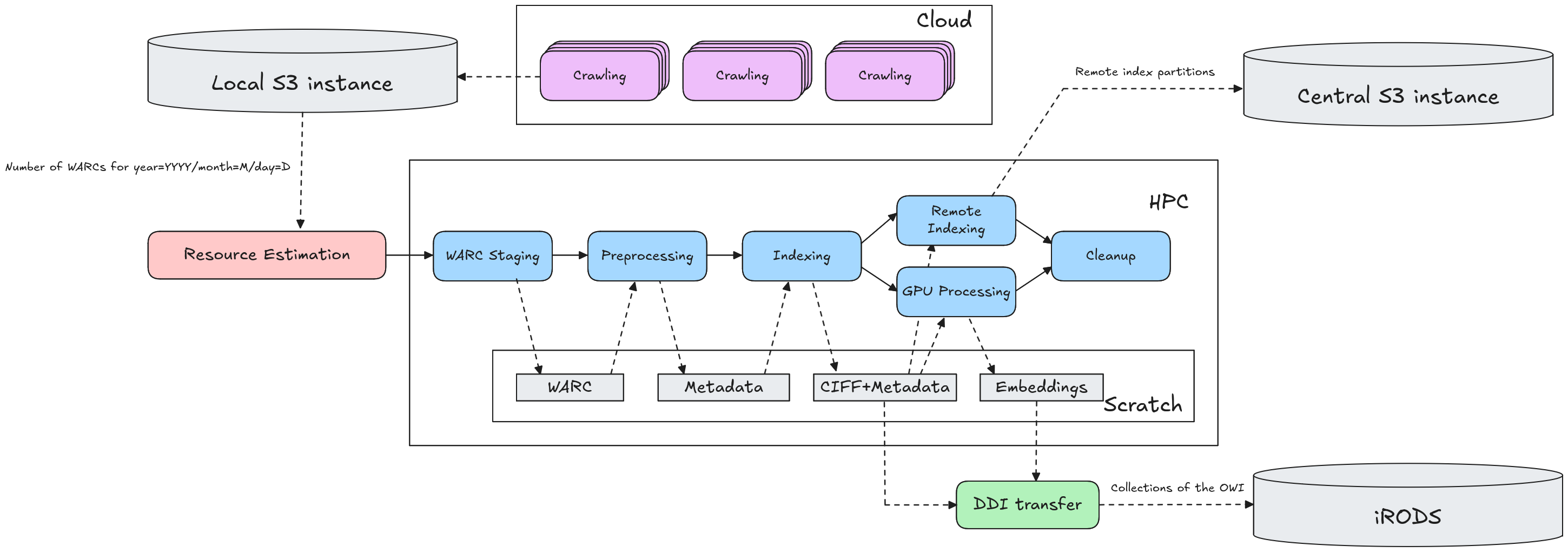
The figure below shows an overview of the different components in this infrastructure.
Workflow Overview#
Each day at 3:00 AM, we start processing the crawl data of the previous day. For each crawl site, we check whether the associated S3 contains new WARC files. If not, we terminate the workflow. Otherwise, we start a batch workflow with several HPC tasks (visible in the figure above). For each HPC batch job, we use the number of WARC files to estimate how many nodes we will need to run the workflow, and for how long.
The workflows are published as a set of script collections in our GitLab group. Each batch job in the daily workflow has a dedicated repository, which contains:
A
confdirectory in which data center specific information (such as scratch locations, Slurm parameters, etc.) can be defined;An
install.shscript, to install the dependencies necessary to run this workflow;An
entrypoint.shscript, which can be called within an HPC batch job allocation to execute the workflow; andAn
sbatch_trigger.shscript, which can be used to allocate the necessary number of nodes through Slurm and then run the entrypoint script.
The workflow repositories and the required software packages are all installed under a project directory on the HPC filesystem. We distinguish between dev and prod versions of the workflows and software (though this distinction is unnecessary for parties who only wish to run the workflows without developing new versions). As a result, our project space looks something like the following:
$PROJECT_DIR/
    workflows/
        dev/
            warc-staging-workflow/
            resilipipe-workflow/
            ...
        prod/
            ...
    software/
        dev/
            resilipipe/
            open-web-indexer/
            ...
        ...
    ...
After each HPC task, we store all intermediate data on HPC scratch storage, both to reduce I/O overhead and to ensure we can restart failed components of the workflows without having to re-run the whole pipeline. The data is stored in a directory for this specific daily execution of the workflows, which is cleaned after the whole workflow has finished successfully. This execution-specific directory is referred to as $WORKFLOW_SCRATCH_DIR. Its structure is shown below.
$SCRATCH/
    workflows/
        dev/
            OpenWebIndex_Main_V2_DATACENTER/
                year=YYYY/
                    month=MM/
                        day=DD/
                            warc_staging/
                            parquet_staging/
                            index_staging/
                            ...
        prod/
            ...
In the rest of this section, we describe the individual HPC tasks of the daily workflows.
HPC Tasks#
WARC Staging [repo]#
To simplify further processing, we first copy all relevant WARC files to HPC scratch storage. The files are stored in $WORKFLOW_SCRATCH_DIR/warc_staging.
Resilipipe [repo]#
Resilipipe is our modular, scalable framework for preprocessing and content analysis of the WARC files. It takes in WARC files and transforms each WARC file into a gzipped Parquet file with the main content, language, relevant collection indices, etc. of each crawled page. See Resilipipe’s README to see which modules are currently implemented, and to find a full overview of the extracted content per page.
The Parquet files are stored in $WORKFLOW_SCRATCH_DIR/parquet_staging. Once a WARC file was fully processed and the corresponding Parquet file was created, the WARC file is deleted to save storage.
Indexing [repo]#
The indexing workflow uses our Spark-based Open Web Indexer to transform the preprocessed Web content into index shards. For each collection index marked by Resilipipe, the indexer creates a dedicated subset, each of which is further split up into language-specific shards. For each shard, we include Parquet files containing the corresponding documents and metadata, as well as an index.ciff.gz that contains an (unstopped and unstemmed) inverted file representation of the index shard in the CIFF format.
We deploy Spark within HPC infrastructure using the spark-deployment repository, which in turn uses the Magpie script collection.
The index shards are stored in the $WORKFLOW_SCRATCH_DIR/index_staging directory, with subdirectories for each collection index:
$WORKFLOW_SCRATCH_DIR/
    index_staging/
        collection=main/
            resource=owi/
                language=eng/
                    index.ciff.gz
                    metadata_0.parquet
                    ...
                ...
        collection=curlie_full/
            ...
        ...
    ...
For each collection index, we create a new iRODS collection, which can be accessed via the dashboard and owilix.
Resilipipe GPU [repo]#
The gpu collection index contains documents that are deemed of high quality and/or importance, and for which we want to enable further GPU-based processing. This is done using Resilipipe GPU, which runs on the GPU partition of an HPC cluster and computes embeddings (and other embedding-based features) for each document.
The documents are read from the $WORKFLOW_SCRATCH_DIR/index_staging/collection=gpu directory, and are stored in the $WORKFLOW_SCRATCH_DIR/embedding_staging directory. Again, the embeddings are uploaded as iRODS collections, but this time with the owie (Open Web Index Embeddings) resource type.
Remote index [repo]#
We also create a “remote index” representation of the Open Web Index that can be queried remotely using tools like DuckDB or Spark. Like the regular index shards, the remote index is also created using the Open Web Indexer. The remote index representation is created within Spark, and the final representation is copied to a central S3 instance using Hadoop DistCp. See our documentation on the remote index for more information on how to access the remote index.
Cleanup [repo]#
As a final step in the daily workflow, we clean up the $WORKFLOW_SCRATCH_DIR to remove all intermediate files that are no longer necessary.
Workflow Orchestration#
The daily preprocessing and indexing workflows are managed in LEXIS. Under the hood, LEXIS runs Apache Airflow, and LEXIS workflows are represented as Airflow DAGs. Our DAG definitions can be found on GitLab. HPC batch jobs are scheduled on HPC infrastructure using HEAppE. An overview of the Airflow DAGs, and how they interact with the HPC centers, can be found below.
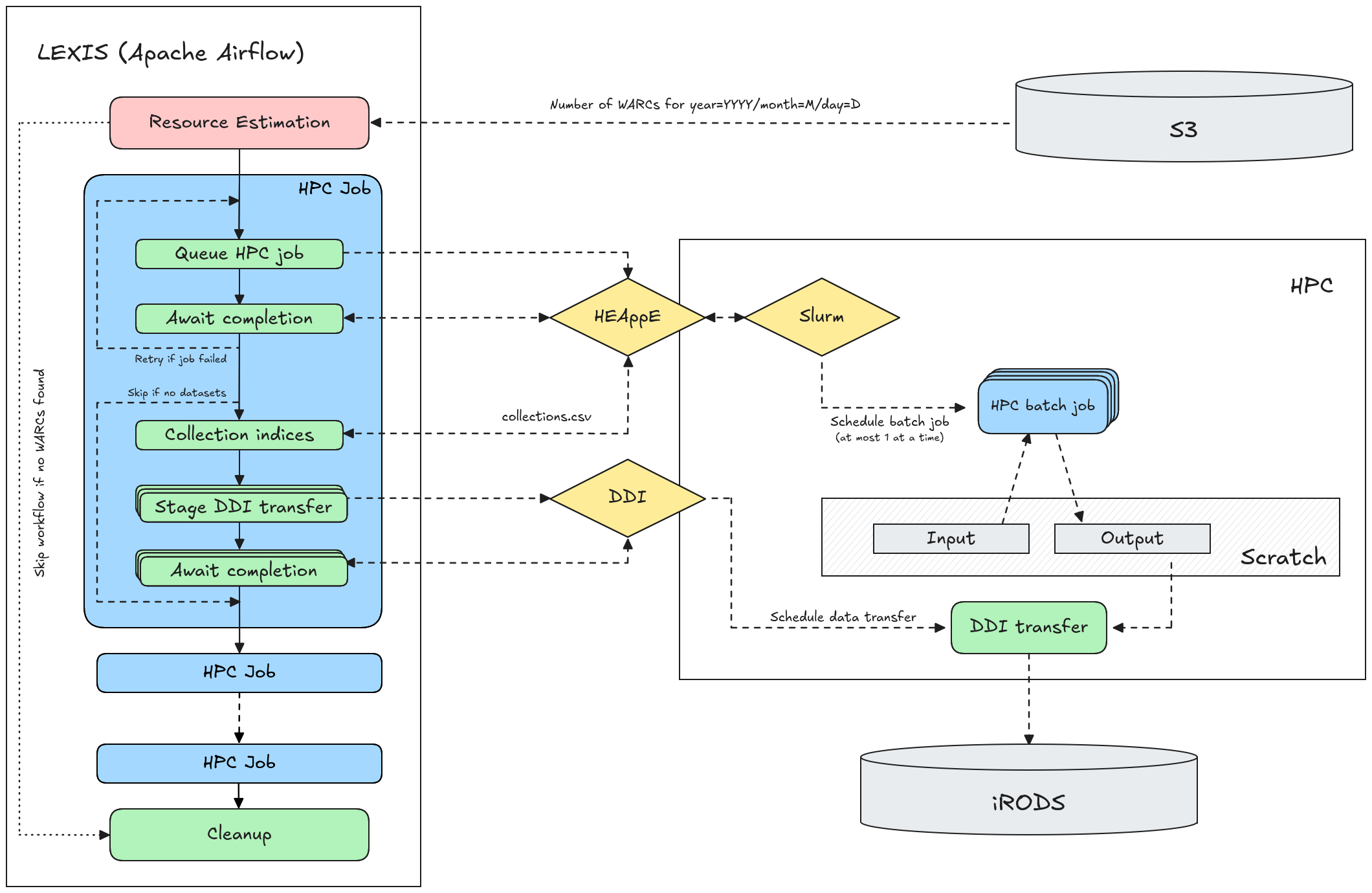
When a workflow is started for a specific data center and date, we first perform a resource estimation step. This counts the number of WARC files for that specific date in the corresponding S3 location, and tries to estimate how many nodes we will need to run each of the batch jobs (e.g. preprocessing or indexing), and how long this will take. If no WARC files are found, the workflow is terminated.
This information is used to configure each of the HPC batch jobs. For each HPC job that is scheduled, the workflow makes a call to the data center’s HEAppE endpoint to queue the job (often through Slurm). The workflow then enters a waiting state, checking periodically whether the HPC job has finished.
After the HPC job has finished, we check the job status through HEAppE, and if the job failed we restart the HPC job or fail the entire workflow. If the job was successful, and produced datasets that need to be stored in iRODS, we fetch a file collections.csv from the HPC working directory that contains an overview of the created collections. For each collection, LEXIS issues a request for the data to be staged to iRODS through the DDI layer. Again, the workflow waits until it receives confirmation that the data was uploaded to iRODS.
Throughout the duration of the job, a set of custom LEXIS operators make sure that active session tokens are refreshed periodically, so that the workflow does not fail due to an inactive session token.
Workflow Configuration#
The workflows are configured using a JSON file, which contains the following fields:
workflows: the data center specific workflows that we are currently running (separated intomainandtestworkflows). Each workflow is defined as:"workflow_name": { "crawl_location": "data_center_x", "hpc_location": "data_center_y", "storage_location": "data_center_z", "test_object_path": "workflow-test" }
Each of the
*_locationfields refers to an Airflow connection, configured for a specific crawl location (S3), HPC location (HEAppE) or storage location (iRODS). See the section on connections below for more information.The
test_object_pathis only required fortestworkflows. It refers to a static path in S3 where a small set of test files reside, which can be used for test or development workflows so we do not have to depend on daily crawl data for these cases.hpc_tasks: the set of HPC tasks we run for each workflow (described in the previous Workflows section). Each task is defined as, for example:"task_name": { "workflow_dir": "task-workflow-directory", "resources": { "warcs_per_node_per_hour": 50, "target_walltime": 14400, "min_nodes": 2, "max_nodes": 10, "node_type": "gpu", "is_array_job": true }, "max_retries": 5, "stage_ddi": true, "depends_on": [{ "task": "previous_task_name", "collection_name": "main", "resource_type": "owi" }] }
The following parameters are supported:
workflow_dir: the subdirectory in$PROJECT_DIR/workflows/{prod,dev}that describes the workflow (and contains theentrypoint.shscript)resources: a configuration that is used to perform resource estimation based on the number of WARC files that were crawled on a day, and prepare the Slurm allocation (e.g. queue type, number of nodes, walltime)max_retries: how often a HPC task can be retried if it fails (e.g. for Resilipipe jobs that timed out but can pick up where they left off by processing only new WARC files)stage_ddi: whether the workflow produces collections that should be pushed to iRODS. Iftrue, we read acollections.csvfile from the HPC job’s working directory and dynamically stage the found collections using the LEXIS DDI layer.depends_on: which task needs to run before this task can start. For instance,indexingdepends onresilipipe. If acollection_nameandresource_typeare provided, we fetch the iRODS collection identifier for the corresponding collection and inject it into HPC environment variables and iRODS metadata (to support data lineage).
The
hpc_tasksconfiguration is overriden in dedicatedparams_v2_dev.jsonandparams_v2_test.jsonfiles, e.g. to use HPC test queues or reduce resource requirements, in order to simplify and speed up test workflows.heappe_job_config: the actual configuration that will be used to schedule HPC jobs through HEAppE. This contains the computed resource requirements and other Slurm parameters, as well as environment variables with S3 credentials and task-specific values (such as the$WORKFLOW_SCRATCH_DIRwe saw earlier).ddi_source: the configuration that describes the HPC source filesystem, which is used when copying files to iRODS using the DDI layer.ddi_target: the configuration that describes the target iRODS filesystem when copying files using the DDI layer, as well as the Datacite metadata that should be attached to the created dataset.
Connections#
Data center connections are configured and managed through Airflow Connections. Our workflows can be configured dynamically, choosing different data centers for crawl storage, HPC processing and iRODS storage. This allows us to, for example, even run workflows for sites that only perform crawling, by choosing a different data center for the HPC and iRODS parts (though it is most efficient to keep all processing local to a single data center to reduce data transfer).
Crawl storage (S3)#
Crawl storage refers to an S3 endpoint and is defined as an “Amazon Web Services” connection (requires the AWS Airflow provider). The following fields are required:
Connection ID: a unique identifier for this S3 endpoint. Should be prefixed with
s3_, e.g.:s3_data_center_xAWS Access Key ID: the S3 access key
AWS Secret Access Key: the S3 secret
Additionally, the following configuration is filled in the “Extra” information field:
{
  "endpoint_url": "https://s3.example.com",
  "region_name": "us-east-1",
  "service_config": {
    "s3": {
      "bucket_name": "s3-bucket-name"
    }
  }
}
HPC center (HEAppE)#
The HPC center configuration mostly describes how HEAppE is configured for that specific data center. We use the “HTTP” connection type. The following parameters are required:
Connection ID: a unique identifier for this HPC center. Should be prefixed with
hpc_, e.g.:hpc_data_center_yLogin: the Slurm account number under which HPC jobs should be submitted
The following HEAppE configuration is specified in the “Extra” field:
{
  "system_name": "Cluster Name",
  "heappe_uri": "https://heappe.example.com",
  "cluster_id": 1,
  "workflow_dir": "/path/to/project/storage",
  "scratch_dir": "/path/to/scratch",
  "node_type_ids": {
    "cpu": 1,
    "cpu_test": 2,
    "gpu": 3,
    "gpu_test": 4
  }
}
The parameters should be configured as follows:
system_name: the name of the HPC cluster as defined in the LEXIS project resources (used for HPC-iRODS data transfer)heappe_uri: base endpoint of the HEAppE API for this data centercluster_id: the ID of the specific cluster of the data center on which to schedule jobsworkflow_dir: the directory in which project files and software are stored (in particular: theworkflowsandsoftwaredirectories described earlier)scratch_dir: the directory in which scratch files can be created for intermediate data storenode_type_ids: for each node type (or Slurm queue) necessary for running the workflows, the ID with which they are registered in HEAppE
To determine the right values for cluster_id and node_type_ids, use the /heappe/ClusterInformation/ListAvailableClusters API endpoint.
Dataset storage (iRODS)#
Finally, the output datasets are copied to iRODS through the LEXIS DDI layer. This is also registered with the “HTTP” connection type, and the following required fields:
Connection ID: a unique identifier for this iRODS storage zone. Should be prefixed with
irods_, e.g.:irods_data_center_zLogin: the project/resource name associated with your iRODS storage (set up in LEXIS)
The “Extra” field contains a single value:
{
  "system_name": "iRODS Storage Name"
}
This system_name is configured in LEXIS as well (under project resources).